Contact us
NEW FIDO2 security key support in Secure Disk for BitLocker

Plug in your FIDO2 key.
Boot your BitLocker PC.

Secure Disk for BitLocker now supports FIDO2 security keys. They work like an extra BitLocker protector: before Windows starts, the user plugs in the FIDO2 security key, enters the FIDO2 PIN, and the BitLocker-protected Windows PC boots. Fully offline, with no web service, and multi-factor thanks to the FIDO2 PIN.

  • Works like an extra BitLocker protector
  • Multi-factor: key + FIDO2 PIN
  • Works offline, no web service needed
  • USB-C and USB-A security keys
  • From USD 50 per endpoint
Pre-boot FIDO2 unlock before Windows starts
USB-C · USB-A FIDO2 security keys
Offline no web service or internet needed
AES-256 BitLocker encryption
What makes it unique

Not just a passkey for the web. Our FIDO2 protector for booting Windows.

FIDO2 security keys usually protect sign-ins once Windows is running. Secure Disk for BitLocker brings the same key to pre-boot: it works like an extra BitLocker protector, so the user can boot a BitLocker-protected Windows PC with it.

Not this

A USB startup key with a copyable key file

BitLocker's own USB startup key is a key file stored on an ordinary USB stick. Anyone who copies that file holds the key. And FIDO2 keys are not available as a BitLocker protector in Windows itself.

This

Booting the BitLocker-protected Windows PC with FIDO2

Secure Disk for BitLocker adds the FIDO2 security key as an additional way to unlock the Windows system drive, before Windows starts. The secret stays inside the key's secure chip and is protected by the FIDO2 PIN. It works fully offline, with no web service involved.

Why FIDO2

The key your users already trust, now at boot

01

Phishing-resistant

FIDO2 is built on public-key cryptography. There is no shared secret to type into a fake page or steal from a server.

02

One key, hundreds of services

A FIDO2 key works with hundreds of applications and web services, from Microsoft Entra ID and Windows Hello for Business to Google, GitHub and many more.

03

Open standard

FIDO2 is an open standard of the FIDO Alliance, supported by many vendors in USB-C and USB-A form factors.

04

Hardware-bound

The secret is generated inside the security key and cannot be exported or copied, unlike a key file on a USB stick.

05

Works offline

No web service, FIDO server or internet connection is needed. The check runs locally between the PC and the key, before Windows starts.

06

Multi-factor by design

Possession of the security key plus knowledge of the FIDO2 PIN: two factors at every boot. The key locks itself after too many wrong PIN attempts.

Already have FIDO2 keys? Use them for BitLocker too.

Your FIDO2 security key already protects sign-ins to many different services. Unlocking BitLocker with Secure Disk for BitLocker is simply one more cryptographic use of the same key, and your other services keep working as before.

We encourage you to use your existing FIDO2 keys for this added encryption benefit. No new hardware, no new habit for your users.

Check my FIDO2 keys
Web sign-insMicrosoft Entra IDWindows Hello for BusinessGoogleGitHubPassword managersSingle sign-on portalsCloud services+ hundreds more+ BitLocker boot with Secure Disk
How it works

From power button to desktop in four steps

1

Power on

Secure Disk for BitLocker starts its pre-boot authentication before Windows loads. The BitLocker volume stays locked.

2

Plug in the FIDO2 key

The user plugs the FIDO2 security key into a USB-C or USB-A port.

3

Enter the FIDO2 PIN

The FIDO2 PIN unlocks the key, and a touch on the key confirms the user is present. Secure Disk for BitLocker verifies the user is authorised to boot this device, fully offline.

4

BitLocker unlocks

The drive is decrypted and Windows starts. With single sign-on, the user continues straight to the desktop.

See FIDO2 pre-boot authentication live

An online demo with our engineers, from plugging in the key to the Windows desktop.

Benefits

Built for everyone who touches the device

For users

  • No long BitLocker recovery passwords to remember, only a short FIDO2 PIN
  • The same security key they use for passwordless sign-in
  • Single sign-on: one authentication from power-on to desktop
  • Plug in, enter the PIN, touch, done, even without a network connection

For IT administrators

  • Reuse the FIDO2 keys you roll out for passwordless sign-in
  • Central management console included at no extra cost
  • Helpdesk recovery for forgotten PINs or lost keys
  • Multiple users per device
  • Mix security keys from different vendors in one policy

For CISOs and management

  • Phishing-resistant multi-factor authentication before the operating system starts
  • No dependency on a web service or cloud, works offline
  • Supports GDPR, NIS2 and ISO 27001 requirements for protecting data on endpoints
  • Audit-ready reporting on encryption and authentication status
  • Predictable cost: a perpetual licence per device, not per user
Features at a glance

Everything you need for FIDO2-based BitLocker boot

✓

FIDO2 security key support

Works with FIDO2 security keys following the open FIDO Alliance standard.

✓

USB-C and USB-A

Plug-in security keys for notebooks and desktops, freely combinable.

✓

Multi-factor authentication

Possession of the FIDO2 key plus knowledge of the FIDO2 PIN, confirmed by a touch.

✓

Pre-boot authentication

The user is verified before Windows and BitLocker unlock the disk.

✓

Single sign-on to Windows

One authentication from power-on to the desktop.

✓

Multi-user devices

Several users, each with their own FIDO2 key, can unlock the same device.

✓

Central management and helpdesk

Manage policies, users and recovery keys from one console, which is included.

✓

Built on TPM 2.0

With Secure Disk for BitLocker 8 and Windows 11, TPM 2.0 strengthens BitLocker and prevents brute-force attacks.

✓

Offline authentication

No web service, FIDO server or internet connection needed at boot.

✓

Vendor-independent

Choose FIDO2 keys from different vendors instead of being tied to one.

✓

Compliance reporting

Prove encryption and authentication status to auditors at any time.

FIDO2 security keys

Examples of FIDO2 security keys

Secure Disk for BitLocker works with standard FIDO2 security keys. Three typical examples:
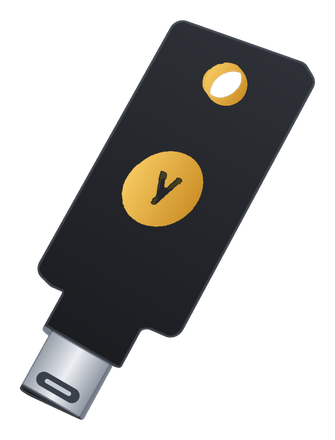
Symbolic YubiKey 5C NFC
FIDO2 key · USB-C

Yubico YubiKey 5C NFC

Widely used USB-C security key. FIDO2 sits next to PIV, OTP and OpenPGP on one key.

Symbolic Swissbit iShield Key 2
FIDO2 key · USB-C

Swissbit iShield Key 2

FIDO2 security key from Swissbit. FIDO2 is included in every model; a FIPS 140-3 version is available.
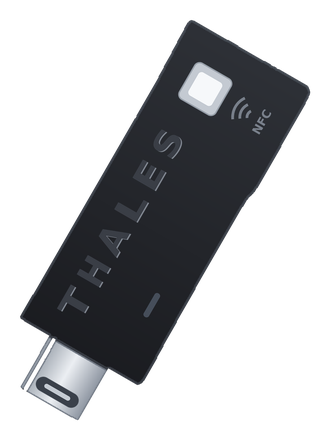
Symbolic Thales eToken Fusion
FIDO2 key · USB-C / USB-A

Thales SafeNet eToken Fusion

FIDO2.1 certified security key in USB-C and USB-A versions, with optional PIV for certificate-based login.

Illustrations are symbolic. Using a different FIDO2 key? Ask us about compatibility.

Use cases

Where FIDO2 boot makes the difference

Passwordless programmes

Extend your FIDO2 rollout for Windows Hello for Business or Entra ID passkeys to the very first step: booting the PC.

Mobile and remote workforce

Notebooks on the road stay locked until the owner plugs in their key, with or without a network connection.

Small and mid-sized businesses

Strong pre-boot authentication with affordable, off-the-shelf security keys.

Healthcare

Personal security keys protect patient data on shared and mobile clinical devices.

Banking, finance and insurance

Phishing-resistant authentication that meets regulatory expectations, from boot to sign-in.

Public sector

Hardware-bound protection for confidential data on every notebook, based on an open standard.

Pricing

Simple, transparent licensing per endpoint

Secure Disk for BitLocker is licensed per Windows device, regardless of how many users work on it. FIDO2 security key support is available from USD 50 per endpoint.

Volume pricing applies to larger roll-outs. Maintenance and support are available for 1, 2 or 3 years. Request a quote tailored to your number of devices.

Request your personal quote
Starting from
USD50
per endpoint
  • FIDO2 security key support (USB-C, USB-A)
  • Offline multi-factor pre-boot authentication and single sign-on
  • Central management console included
  • Licence per device, not per user
  • Volume discounts for larger deployments
Get pricing for your fleet

Perpetual licence plus optional maintenance. Security keys are not included. Prices exclude VAT.

FAQ

Frequently asked questions

What is a FIDO2 security key?
FIDO2 is an open authentication standard of the FIDO Alliance and the W3C. A FIDO2 security key is a small USB device that creates and stores cryptographic keys on a secure chip, protected by a FIDO2 PIN. Because the private keys never leave the chip, FIDO2 sign-ins are resistant to phishing.
Does Windows BitLocker support FIDO2 keys on its own?
No. Windows does not offer FIDO2 security keys as a BitLocker protector. Its USB startup key is a key file on a normal USB stick. Secure Disk for BitLocker uses the FIDO2 security key like an extra BitLocker protector at pre-boot, so the user can boot the BitLocker-protected Windows PC with it. This is a unique feature of Secure Disk for BitLocker.
Does it need an internet connection or a FIDO web service?
No. For web sign-ins, a FIDO server (the website or identity provider) checks the key. Secure Disk for BitLocker checks the FIDO2 key locally on the device, before Windows starts. No web service, cloud or network connection is needed, so it also works on the road, on a plane or in isolated networks.
Is this multi-factor authentication?
Yes. The user needs the FIDO2 security key (something you have) and the FIDO2 PIN (something you know). The PIN is checked by the key itself, and the key locks after too many wrong attempts. A stolen key alone cannot boot the PC.
Do we need a certificate authority or X.509 certificates?
No. FIDO2 authentication with Secure Disk for BitLocker works without a certificate authority (CA), a PKI or X.509 certificates. There are no certificates to issue, renew or revoke. You simply register the FIDO2 security key for the user.
Can we use the FIDO2 keys we already have?
Yes, and we encourage it. A FIDO2 key can serve hundreds of applications and web services at the same time. If your organisation already uses FIDO2 security keys, for example for Windows Hello for Business, Microsoft Entra ID or web sign-ins, Secure Disk for BitLocker simply adds BitLocker unlock at boot as one more use of the same key. Contact us and we will check compatibility. System requirements are listed in our Knowledge Base.
Does BitLocker unlock affect my other FIDO2 sign-ins?
No. Unlocking BitLocker with Secure Disk for BitLocker is an extra cryptographic use of the FIDO2 key, next to all the services it already protects. Your web and cloud sign-ins keep working exactly as before.
What is the difference to PIV smartcards and PIV tokens?
PIV uses X.509 certificates and typically builds on an existing PKI. FIDO2 is the standard behind passkeys and passwordless sign-in and needs no certificates or PKI. Secure Disk for BitLocker supports both, so you can choose what fits your organisation.
What happens if a user forgets the FIDO2 PIN or loses the key?
Secure Disk for BitLocker includes helpdesk functions that let IT restore access securely, without exposing the BitLocker recovery key to the user. A lost key can be removed from the device, and a replacement key can be registered.
Do I need a TPM?
Yes, starting with Secure Disk for BitLocker 8 and Windows 11 a TPM 2.0 chip is required to run BitLocker. This is a great security enhancement to BitLocker and prevents brute-force attacks.
How much does it cost?
FIDO2 security key support in Secure Disk for BitLocker starts from USD 50 per endpoint. The final price depends on the number of devices and the maintenance term. Request a quote.
Get started

Ready to boot BitLocker with your FIDO2 key?

Tell us about your environment and the security keys you use, and our team will show you how FIDO2 pre-boot authentication fits in, with a live demo and a quote tailored to you.